Naveen Teja
5/24/2026
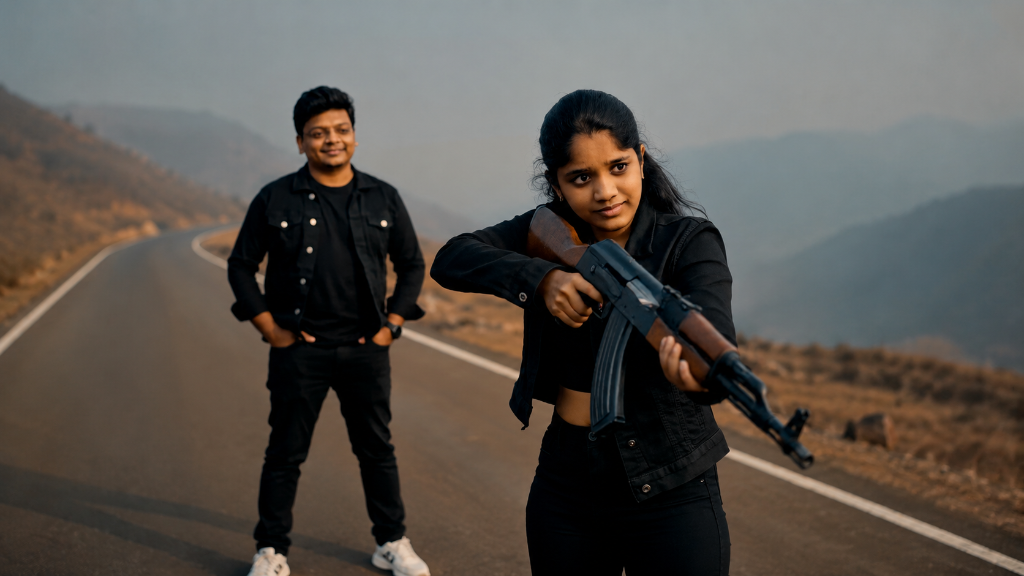
How I Created a Cinematic AI Action Reel (ChatGPT + OpenArt + Seedance 5.0)
AI video generation has evolved rapidly, but if you've ever tried to generate a multi-character narrative scene, you know the major pain points: characters that shift faces between shots, cameras that wander randomly, and a complete lack of spatial continuity.
Recently, I set out to create a cinematic action reel as a tribute to my wife. The concept was simple yet dramatic: a calm man stands alone on a desolate mountain road at sunset; gangsters emerge from the mist and approach; and before danger can strike, his wife steps forward from the shadows to protect him.
The final result looked like an excerpt from a multi-million dollar blockbuster. Since sharing it, I've had countless creators, developers, and filmmakers ask how I solved the spatial geography and character consistency problems.
Here is the exact step-by-step workflow, prompting strategies, and lessons I learned from blending ChatGPT, OpenArt AI, and Seedance 5.0.
Step 1: Crafting High-Fidelity Character References in ChatGPT
The foundation of any consistent AI narrative is the character reference. Standard text-to-video models are notoriously bad at retaining facial features across different angles. To combat this, I started by generating ultra-clean studio portraits to serve as "anchors" for the AI video generator.
First, I uploaded a high-quality reference photo of myself and one of my wife into ChatGPT.
I then executed the following prompt to normalize the style, lighting, and composition:
Transform this photo into an elevated fashion studio portrait. Choose a complementing-color background that enhances the subject's skin tone. Keep a tight head-and-shoulder composition with the subject centered and facing the camera straight with an optimistic expression. Apply directional lighting with subtle shadows. Preserve natural skin tones while making the image polished, minimal, and editorial—like a magazine photoshoot.
Why this works:
- Neutral Angles: Having the characters face the camera straight makes it significantly easier for video generation models (like Seedance) to map facial structures.
- Controlled Lighting: Clean studio lighting removes complex shadows that the video AI might interpret as permanent facial marks or skin irregularities.
- Minimalist Background: Eliminates visual noise so the model focuses entirely on extracting the subject's facial features.
Step 2: Refining Lighting and Correcting AI Anomalies
Even with a great output, first-generation AI portraits often contain micro-anomalies—uneven lighting, minor skin artifacts, or slight color cast issues. To achieve true cinematic quality, I re-uploaded the generated portraits back into ChatGPT for a refinement pass.
I used this specialized lighting prompt:
Improve the lighting while keeping everything else exactly the same. Do not change the person, pose, expression, background, or composition. Fix issues like back lighting, harsh shadows, underexposure or uneven lighting. Transform the original lighting into soft, natural, flattering light coming from slightly above eye level and facing the subject, so the face is evenly lit with realistic skin tones. Keep the result photorealistic and consistent with the original scene.
By ensuring the face is evenly lit with natural tones, we build a highly stable reference image. If you skip this step, the downstream video generator will struggle to maintain consistency as the camera pans or the character moves.
Step 3: Choreographing the Scene in OpenArt AI
With our polished character references in hand, it was time to step into the director's chair. I selected OpenArt AI, uploaded the refined portraits under the Characters reference tab, and chose Seedance 5.0 as the core rendering model.
Successful AI filmmaking requires you to stop thinking in simple keywords and start thinking like a Director, Cinematographer, and Editor all at once. You must explicitly define:
- Cinematic Geography: Where are the characters relative to each other?
- Camera Mechanics: Is it a push-in, a pan, or a low-angle tracking shot?
- Pacing and Timing: Breaking the prompt down into timestamped blocks prevents the generator from compressing multiple actions into a single chaotic movement.
The Master Video Generation Prompt
Here is the exact prompt I engineered to handle the composition, spatial logic, and action choreography:
Use Male and Female as the exact character references. Maintain exact facial identity, hairstyle, skin tone, body proportions, and outfit consistency throughout all shots.

Both characters wear:
black jackets,
black t-shirts,
black pants,
white shoes.

Style:
High-budget cinematic action movie. 35mm anamorphic lens, realistic lighting, dramatic sunset atmosphere, cinematic fog, drifting dust, realistic cloth physics, realistic smoke, photorealistic textures, blockbuster action-film quality, 9:16 vertical.

IMPORTANT CHARACTER POSITIONING RULE:
Male stands facing forward toward the gangster group.
Female DOES NOT come from the gangster side.
Female enters ONLY from BEHIND Male, specifically from behind his LEFT SHOULDER area, then walks FORWARD past him toward the gangsters.
Female and the gangster group must NEVER walk together in the same direction.

00:00 - 00:03 | Hero Introduction
Wide cinematic shot on a lonely mountain road surrounded by massive hills and sunset fog. Male stands alone in the center of the road with both hands inside his jacket pockets. Calm confident expression. Camera slowly pushes toward him from a low angle. Wind moves his jacket naturally.

00:03 - 00:05 | Gangster Reveal
Camera moves behind Male and looks FORWARD toward the opposite side of the road. In the FAR FRONT DISTANCE, a dangerous gangster group walks aggressively TOWARD Male. They are far away from him. Some are loading rifles and pistols while walking. Dust rises around their feet.

00:05 - 00:07 | Silent Confidence
Medium close-up front shot of Male. Calm slight smile. Hands still inside pockets. Gangsters remain blurred in the FAR BACKGROUND IN FRONT OF HIM.

00:07 - 00:09 | Female Entrance From Behind
Camera positioned BEHIND Male.
Female enters frame FROM BEHIND HIM on his LEFT SIDE.
She walks FORWARD past Male, moving AWAY FROM CAMERA toward the gangster group.
She crosses in front of Male and positions herself BETWEEN Male and the gangsters.

00:09 - 00:13 | Attack Sequence
Female steps IN FRONT OF Male, aims the rifle TOWARD the gangster group, and begins firing while slowly walking FORWARD toward them.
Large cinematic muzzle flashes.
Realistic shell casings eject onto the road.
Gangsters are hit and fall backward one by one.
Dust and smoke explode around impacts.

00:13 - 00:15 | Final Walking Ending Shot
Wide cinematic back shot.
Male and Female are now walking AWAY FROM CAMERA together down the empty mountain road after the fight.
Camera follows slowly from behind them.
Male gently places his RIGHT HAND around Female’s shoulders while walking beside her.
Female carries the rifle lowered in one hand while calmly walking forward beside him.
Smoke drifts across the road.
Golden sunset light shines through the fog.

Ultra realistic cinematic motion, realistic recoil physics, cinematic smoke, drifting dust particles, blockbuster action choreography, 4K HDR, 60fps.
Overcoming the Spatial Continuity Problem
The biggest hurdle in AI video generation is spatial orientation.
Without strict constraints, the AI defaults to the easiest path—which often results in characters randomly swapping positions, walking backwards, or spawning in the wrong direction. During early generations, the female character kept spawning with the gangsters, or walking in the wrong direction.
To fix this, I introduced a strict coordinate system in text. The breakthrough instruction was:
"She walks FORWARD past Male, moving AWAY FROM CAMERA toward the gangster group."
By grounding the character's movement in relation to the camera's viewport and reference anchors, the model finally resolved the geometry and executed the block perfectly.
Post-Production: Sound Design and Final Polish
Once the video files were generated, the raw canvas was complete. However, raw AI video is silent and sterile. To give it weight, I brought the clips into CapCut for editing and sound design:
- Atmosphere & Foley: Added low wind rumbles, gravelly footsteps for the gangsters, and mechanical gun sounds (reloads and shell drops).
- Visual Pacing: Cut on action, matching the transition points to the cinematic beats.
- The Hook: Added a simple text overlay at the end: "Based on true events."
A narrative twist at the very end grounds the video emotionally, transforming it from a mere tech demo into a compelling visual story.
Key Takeaways for AI Filmmakers
This project cemented a few core rules for anyone looking to build cinematic reels using generative tools:
- Stop prompting, start directing: The best outputs happen when you frame prompts like instructions for a real camera crew and actors on set. Mention lenses (e.g., 35mm anamorphic), lighting (e.g., sunset fog, backlighting), and spatial layout.
- Control the workflow pipelines: Break the process down. Generating portraits, refining them, and then feeding them to a video model provides infinitely more control than attempting to do it all in a single prompt.
- Sound is 50% of the film: A high-end action sequence is nothing without heavy foley, base-boosted muzzle flashes, and a atmospheric cinematic score. Spend time in post-production.
Final Thoughts
Technology is just an enabler. While the software generated the pixels, the core inspiration came from real life—a small tribute to the partner who stands with us (and occasionally in front of us) in every storm.
What AI film project are you working on next? Let's discuss in the comments below!